
🔐 Phone Activation Method for Windows 11 (Pro or Home)
✅ Step-by-Step Activation Guide
Step 1: Open Activation Settings
-
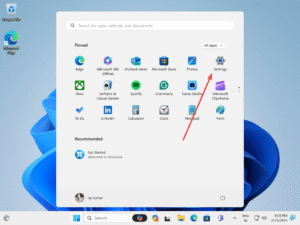
Click Start → Settings (⚙️)
-
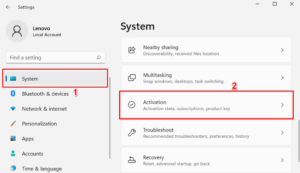
Go to System → Activation
-
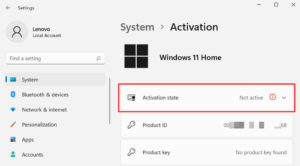
If Windows isn’t activated, it will show “Not Active ⛔”
Step 2: Enter Your Product Key
-
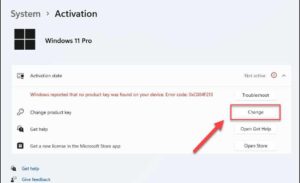
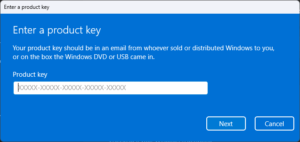
Under Change Product Key, click Change
-
Enter the 25-digit key you received by email (format:
XXXXX-XXXXX-XXXXX-XXXXX-XXXXX) - Also Make sure that you must have the correct version of windows installed for which you have purchased the key.
-
Click Next → then click Activate
⚠️ You may see an error: “Unable to Activate Windows” — this is expected. Just close the window.
Step 3: Choose Phone Activation
-
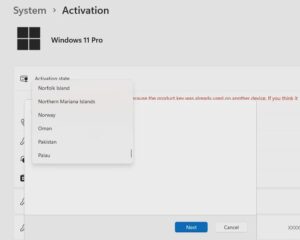
Back in the Activation Settings, click on “Activate by Phone”

-
Select your Country/Region and click Next
- If you can’t see the Activate by phone option then Restart your system and then check or use the SLUI 4 Run command- Press Windows + R Key on keyboard, Type:
slui 4and then Press Enter.
Step 4: Call Microsoft or Share Installation ID
-
You’ll see:
-
A toll-free Microsoft number
-
A unique Installation ID (9 blocks with 7-digit numbers)
-
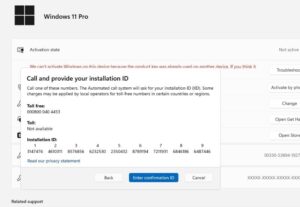
📞 Microsoft Toll-Free Number (India): 0008000404453 (Dial the complete Number, Don’t delete any zeros. Dial from Jio, Airtel, and Vi Numbers only.)
OR Visit the New Easy and Fast Microsoft Product Activation Portal-
🌐 Visit the official portal: https://aka.ms/aoh
🔁 Two Options:
✅ Option 1: Activate via Phone (Self)
-
Call the Microsoft number to get the portal link or directly visit the portal and follow instructions to get a Confirmation ID
-
Enter the Confirmation ID into blocks A–H
-
Click Activate Windows
🤝 Option 2: Let Us Help You
-
If you can’t call or Unable to use the Portal, simply:
-
Take a clear photo or screenshot of the Installation ID
-
Send it to us via WhatsApp
👉 Contact Us on WhatsApp -
Mention your Order ID
-
Our team will generate and send you the Confirmation ID within a few minutes
-
Step 5: Final Activation
-
Enter the Confirmation ID into blocks A to H
-
Click Activate Windows
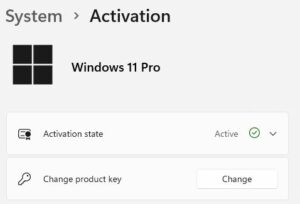
✅ You should now see: “Windows is activated”
✅ To Verify Activation:
-
Go to Settings → System → Activation
-
You should see:
“Windows is activated with a digital license”
⚠️ If You See: “Can’t Activate Windows by Phone”
-
Restart your system
-
If the issue continues, click Troubleshoot
-
It should then show: “We’ve activated this copy of Windows”
